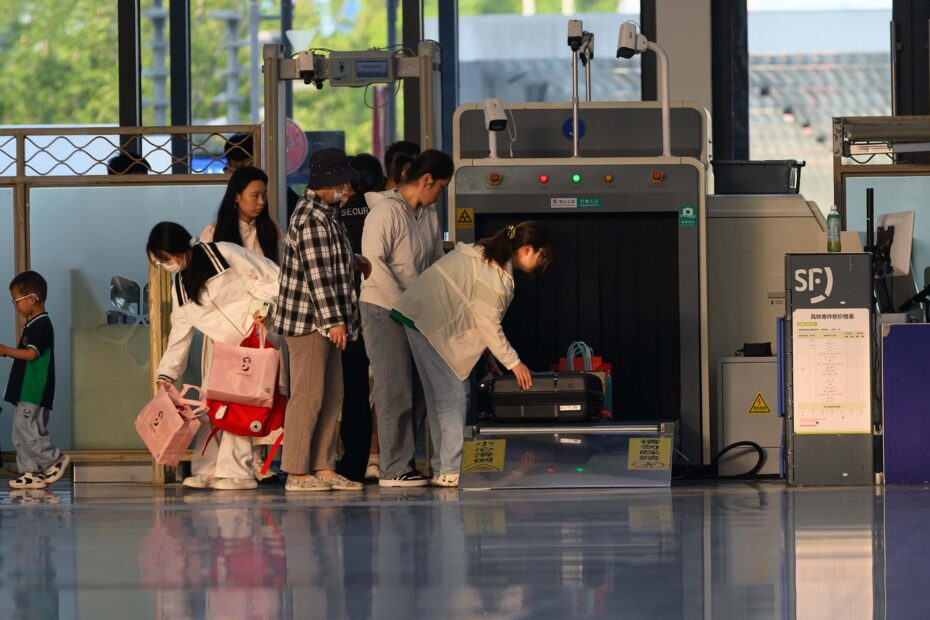
Before reaching the secure concourse, travelers pass identity checks, body screening, and bag imaging designed to detect weapons, explosives, and prohibited threats. Each machine addresses a separate risk, while your lane, airport equipment, and travel status shape the routine you follow.
This walkthrough covers document review, bag imaging, body screening, alarm resolution, and packing choices for travelers who want fewer surprises at the checkpoint.
The Checkpoint Uses Separate Security Layers
A checkpoint stops dangerous items before they reach aircraft gates. In the United States, the Transportation Security Administration (TSA) oversees screening at most commercial airports. Airport security screening focuses on weapons, explosives, incendiary materials, and objects that could threaten an aircraft or those aboard it.
Your trip through the checkpoint has four parts: identity review, carry-on bag screening, passenger screening, and checked-baggage screening behind the scenes. A Travel document checker does not inspect suitcase contents, and an Advanced Imaging Technology (AIT) body scanner does not review your flight reservation.
Each Layer Answers a Different Security Need
Identity review confirms that your boarding record allows access to the secure area. A Carry-on baggage X-ray scanner reviews items inside your bag, while a Walk-through metal detector or AIT body scanner checks items carried on your person.
Procedures shift with the airport, lane, equipment in service, TSA PreCheck status, and threat information. Follow signs and officer directions in your lane, even after using a different routine at another terminal.
Document Review Starts the Airport Security Checkpoint Process
Your visible checkpoint sequence starts at the Travel document checker. You present a valid ID and boarding pass, or an officer confirms your boarding status through a digital record connected to your identification.
That comparison matches your name and flight details before you reach the bins and conveyor. Your ID needs to meet TSA requirements, while your boarding record needs to show a departing flight from that airport.
Lane Choice Changes Your Preparation
| Lane type | What changes | What remains the same |
|---|---|---|
| Standard lane | You follow removal instructions for the equipment in use. | Your bags and person still receive screening. |
| TSA PreCheck lane | You can keep shoes, belts, and laptops in place in eligible lanes. | You still pass through screening technology. |
| Family lane | You have added room and a slower pace for children or gear. | Your supplies remain subject to inspection. |
| Assistance lane | You can receive help with mobility aids or medical needs. | Officers still resolve alarms before clearance. |
Families with a stroller, a traveler using a wheelchair, and someone carrying breast milk can need more setup time than a solo business traveler. Tell the officer about a medical device or accessibility need before your property reaches the conveyor.
Keep your ID, boarding pass, and phone in one accessible pocket until document review is complete. Searching through a carry-on at the podium slows your lane before bag screening begins.
Carry-On Bags Move Through X-Ray or CT Imaging
After identity review, your property enters a machine that produces an image for an officer. Carry-on bag screening does not identify every object with certainty. It highlights shapes, densities, and materials that resemble prohibited items or conceal them.
Conventional X-Ray and CT Systems Show Different Detail
| System | Image type | What you may need to remove |
|---|---|---|
| Carry-on baggage X-ray scanner | Flat, layered image | Laptop, liquids, food, and dense electronics can require separate bins. |
| Computed tomography (CT) scanner | Detailed three-dimensional image | More items can stay inside, subject to lane instructions. |
A Computed tomography (CT) scanner rotates around the bag and lets officers inspect slices from several angles. That detail can separate a camera battery from a shape that needs closer review. Your bag can still be opened after an unclear image.
Dense Packing Can Obscure Nearby Items
A packed lunch, tangled charging cords, or a large camera can block the view of nearby property. For example, a jar of peanut butter counts as a spreadable gel under carry-on liquid rules, even though it does not pour like water.
Liquids, aerosols, gels, creams, and pastes in carry-on baggage follow the 3-1-1 liquids rule in standard lanes. Containers must hold 3.4 ounces or less and fit inside one quart-sized bag. Medical liquids, breast milk, and infant feeding supplies follow separate procedures, though officers can inspect them.
Do not place an uncertain item on the belt and hope the image resolves it. Ask an officer before loading tools, batteries, powders, or food packed in dense containers.
Body Screening Identifies Concealed Objects Without Showing Anatomy
After your bags enter the tunnel, you pass through either a Walk-through metal detector or an AIT body scanner. The metal detector responds to metal. The millimeter-wave scanner checks for items concealed under clothing, including nonmetal objects.
Highlighted Areas Require a Focused Resolution
An orange or highlighted area on a TSA scanner marks an anomaly on a generic body outline. It does not show a detailed anatomical image, and it does not identify whether the item is harmless, medical, or prohibited.
Your clothing folds, belt buckle, forgotten tissue, or an item in a pocket can trigger that marked area. The officer resolves it through a focused Physical pat-down, removal of an item, or another pass through the portal.
Personal and Medical Items Receive Focused Screening
Tampons, ostomy supplies, prosthetics, compression garments, and insulin pumps can trigger an alarm or need closer review. A body scanner cannot see private anatomy or diagnose a medical condition. It identifies an area where screening staff need to rule out a concealed object.
Tell an officer discreetly about a prosthetic, pump, ostomy pouch, or similar device before the scan begins. You can request a private screening area for a pat-down, and a companion can join you there where procedures allow.
Alarms Lead to TSA Secondary Screening Steps
An alarm is a screening result, not an accusation. TSA secondary screening follows a machine alert, an unclear bag image, a random selection, or a property issue that needs direct review.
The Resolution Matches the Alarm Type
- Targeted bag search: An officer opens the carry-on and reviews the area that blocked or raised concern during image review.
- Physical pat-down: An officer checks the location marked by the body scanner or resolves a walk-through detector alarm.
- Trace swab: A swab from your hands, bag, or item is analyzed for trace explosive residue.
- Repeat portal pass: You remove a forgotten item and pass through the detector or scanner again.
- Property inspection: Food, electronics, powders, or batteries receive closer visual review.
Explosive Trace Detection uses a small swab, not a needle or chemical spray on your belongings. Trace alerts can follow contact with fertilizers, firearm residue, industrial materials, or contaminated surfaces. An alert starts a resolution process rather than proving intent.
A pat-down follows defined procedures and is performed by an officer matching the gender you present. You can request private screening and ask for a companion to join you. Keep your hands visible while staff resolve the alert.
Avoiding preventable alarms begins before arrival, with choices that make both bags and clothing easier to screen.
Packing and Clothing Choices Reduce Checkpoint Delays
A bag that produces a clear image moves through the lane with fewer interruptions. Put small liquid containers in one clear bag, keep electronics within reach, and avoid burying loose batteries under clothing or snacks.
The Pre-Belt Routine Keeps Property Organized
- Empty pockets: Remove coins, keys, tissues, and phones before entering the screening portal.
- Group liquids: Keep compliant containers together so your lane can inspect them without unpacking the entire bag.
- Separate dense gear: Place cameras, laptops, and large electronics where you can remove them quickly when directed.
- Wear simple layers: Outerwear, bulky scarves, and metal accessories can require removal in a standard lane.
- Protect medical supplies: Keep devices and medication together, then tell the officer about them before screening starts.
- Check restricted items: Put knives, large tools, and cabin-restricted property into checked baggage before arriving.
What to remove at airport security depends on the lane and the equipment in use. Your shoes, belt, jacket, laptop, or quart bag can stay packed in a CT-equipped or TSA PreCheck lane. An officer can still direct you to remove any item that blocks screening.
Cabin restrictions differ from checked-baggage rules. A full-size liquid bottle cannot travel in a standard carry-on bag, though it can travel in checked luggage. Spare lithium batteries belong in carry-on baggage because airline crews need access to them rather than placing them in a cargo hold.
Because baggage is screened and handled differently after check-in, items acceptable onboard may still face separate rules.
Checked Bags and Traveler Accommodations Follow Separate Paths
Your checked suitcase follows a different route after the airline accepts it. It receives screening before loading, away from the passenger checkpoint. That is why you do not stand beside it during inspection.
Checked Baggage Uses Larger Screening Equipment
Large baggage systems review suitcases for dangerous contents before airline crews load the aircraft. A bag needing further inspection can be opened under TSA procedures, and a notice can be placed inside afterward.
That separation explains why a cabin-restricted item is not always barred from checked baggage. Firearms have strict airline and TSA declaration rules, while spare lithium batteries remain a carry-on issue because of fire response limits in cargo areas.
TSA PreCheck Reduces Removal Steps
Eligible travelers often keep shoes, belts, and laptops in place, but they still undergo screening. Your boarding pass needs to show eligibility, which depends on an eligible Known Traveler Number (KTN) attached correctly to your airline reservation.
Traveling with children, mobility equipment, breast milk, a CPAP machine, or medically necessary liquids can call for accommodations. You can ask for assistance before property reaches the belt, giving staff time to use the right procedure without rushing your preparation.
Clear Instructions Help You Reach the Gate Smoothly
Lane instructions matter more than habit. Give yourself extra airport time, watch the signs above your conveyor, and ask before handling an item that seems unclear.
Your phone is not part of routine checkpoint screening in the same way as your carry-on bag. Officers can request access to property needed to resolve a security issue, though routine airport screening is not a forensic phone search. Border-search rules at international entry points are separate.
Calm preparation keeps small issues from spreading through your trip. An orange body-scan mark, an opened backpack, or a trace swab means the process needs another step. After staff resolve the issue, you collect your property and continue toward your gate.
What to Remember at the Checkpoint
Three overlapping controls verify travel status, inspect belongings through imaging, and flag concealed items with body-screening equipment. Pack so your property is easy to inspect, follow the lane in front of you, and view an alarm as a screening task rather than a personal judgment.
FAQ
How does airport security screening work step by step?
You begin with ID and boarding verification, then place carry-on property on the conveyor for imaging. Next, you pass through a metal detector or body scanner. Any bag image, alarm, or trace result needing resolution leads to focused screening before you collect your belongings and continue to the gate.
What happens to your ID and boarding pass at the TSA checkpoint?
Your ID and boarding pass confirm that your name and flight record match access to the secure concourse. The Travel document checker can review a physical boarding pass or confirm your boarding status through a digital record tied to your identification.
What do airport body scanners and carry-on bag scanners detect?
Body scanners identify items concealed under clothing, including nonmetal objects, while metal detectors respond to metal. Carry-on bag scanners show shapes, densities, and materials inside your property. Both systems flag areas needing closer review rather than identifying every object with certainty.
What shows up orange on a TSA scanner?
An orange or highlighted area marks an anomaly on a generic body outline. It can come from an object, clothing fold, tissue, medical supply, or material the scanner cannot classify. You receive a focused check of that location until the officer resolves the alarm.
What can trigger additional TSA screening?
Your screening can expand after a bag image is unclear, a metal detector sounds, a body scanner marks an area, or an Explosive Trace Detection swab alerts. Random selection and items needing closer review can also lead to extra steps without suggesting wrongdoing.
Why do some travelers have to remove shoes, laptops, liquids, or belts?
Removal instructions depend on your lane and the imaging equipment in use. Standard lanes can require shoes, belts, laptops, liquids, food, or outerwear to enter separate bins. CT-equipped lanes and TSA PreCheck lanes can allow more property to stay packed.